If you are a state government employee in Madhya Pradesh, there is one digital platform that directly controls your financial life — the MP Treasury IFMS Portal, officially available at https://mptreasury.gov.in. IFMS stands for Integrated Financial Management System. The Madhya Pradesh Treasury Department launched this portal to bring every government financial transaction under one digital roof — salary disbursement, provident fund management, challan payments, pension services, and much more.
Before IFMS, government employees had to visit their accounts office, submit written applications, and wait weeks just to get a pay slip or check their GPF balance. Today, the same tasks take less than two minutes from any smartphone or computer.
The 2026 version of the portal is a significant upgrade. It introduces bulk pay slip downloads, an annual salary certificate generator, UPI-linked salary alerts, and a strengthened security framework — all features we will cover in detail throughout this guide.
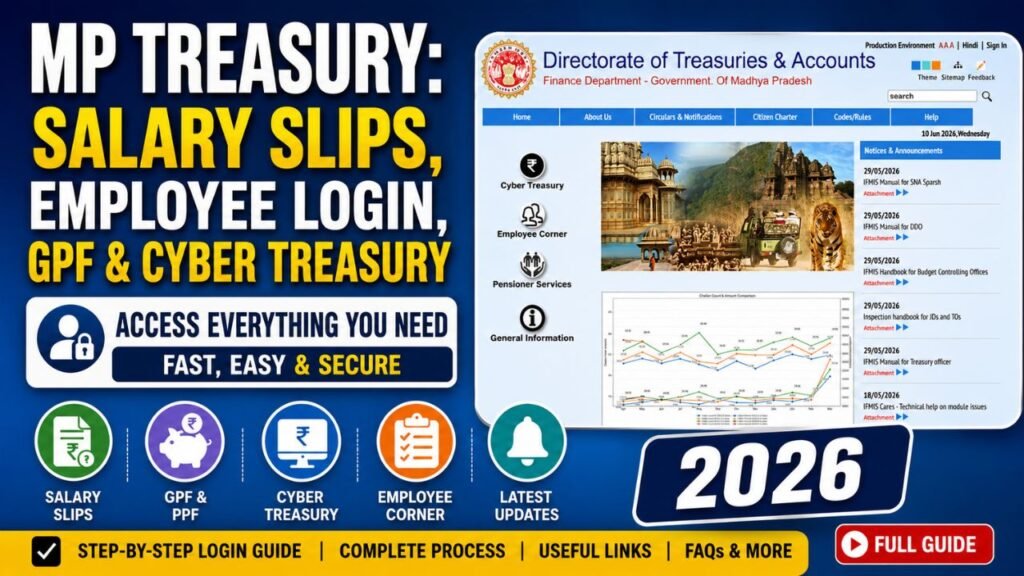
Three Core Modules of the MP IFMS Portal
Understanding the structure of the portal makes navigation far easier. The platform is built around three primary modules:
1. Employee Self Service Module
This is where salaried government employees spend most of their time. It covers:
- Monthly pay slip downloads
- GPF (General Provident Fund) balance and transaction history
- Salary payment tracking — from bill preparation to bank credit
- Service book records
- Income tax computation and Form 16 access
2. Cyber Treasury Module
This module serves both government employees and ordinary citizens. It allows anyone to pay state government dues online — taxes, licence fees, examination charges, departmental fines, and more — without visiting a treasury counter.
3. Pension Services Module
Designed for retired employees and family pensioners, this section handles life certificate submissions, monthly pension slip downloads, and family pension application processing.
MP Treasury IFMS Portal Employee Login 2026: Step-by-Step Process
Many new employees struggle at this stage because they try to self-register — which the portal does not allow. Here is the correct process:
Before Your First Login: Account Creation by DDO
Your IFMS account is not created by you. It is created exclusively by your Drawing and Disbursing Officer (DDO). As a new employee, follow these steps immediately after joining:
- Visit your DDO with your original appointment letter
- Ensure the mobile number registered with your Aadhaar is active and accessible
- Your DDO will initiate your account in the system
- You will receive a temporary User ID (typically starting with MPGOV) and a one-time password via SMS
How to Log In for the First Time
Step 1 — Open the official website
Go directly to https://mptreasury.gov.in. Use Google Chrome or Mozilla Firefox for the best experience. Always verify the padlock icon in the address bar — this confirms a secure, encrypted connection to the genuine government server.
Step 2 — Find the Employee Login section
The login box is prominently placed on the homepage. You will also find a “Forgot Password?” link and a first-time user guide right there.
Step 3 — Enter your credentials
You will need three things:
- User ID / Employee Code — your unique identifier assigned by the DDO
- Password — case-sensitive; check your Caps Lock before typing
- CAPTCHA — type the characters shown; click refresh if they are unclear; an audio CAPTCHA is also available for visually impaired users
Step 4 — New device security check
If you are logging in from an unrecognised device, an additional confirmation screen may appear. This is an intentional security layer. Follow the prompt and proceed to your dashboard.
2026 Password Policy — What You Must Follow
On your first login, the portal will force a mandatory password change. The new policy requires:
- Minimum 12 characters
- A combination of uppercase letters, lowercase letters, numbers, and special characters
- Example format:
MP@Govt#2026Jul
Passwords that do not meet this standard are rejected outright.
How to Download Your MP Treasury Salary Slip in 2026
The pay slip is the most requested document in a government employee’s career — needed for home loans, income tax filing, visa applications, and identity verification. Here is the exact process:
Steps to Download Your Monthly Pay Slip
- Log in to your IFMS employee account
- From the top navigation menu, click “Reports”
- Select “Employee Payslip Report” from the dropdown
- Choose the month and year for which you need the slip
- Select your preferred download format:
| Format | Best Used For |
|---|---|
| Official submission, printing, email attachments | |
| Excel / CSV | Personal record-keeping, budget planning |
| Digitally Signed JSON | Finance apps, machine-readable verification |
Security Note: All downloaded PDF pay slips are encrypted with AES-256, a military-grade standard. To open the file, you must verify your identity via an OTP sent to your registered mobile number. This ensures your financial data stays private even if someone else gets the file.
New Pay Slip Features Added in 2026
Bulk Download: Select multiple months and download them all in one click — a massive time-saver during ITR season when you need the entire financial year’s records.
Annual Salary Certificate: A single-page document summarising your complete yearly earnings. Widely accepted by banks, passport offices, and visa authorities.
Historical Access: For migrated accounts, pay slips going back to April 2009 are now retrievable — over 15 years of records at your fingertips.
Understanding Your Pay Slip: A Complete Breakdown
When you open your salary slip, you will see a clean two-section layout:
Earnings Side
| Component | Details |
|---|---|
| Basic Pay | As per your pay level in the revised pay matrix |
| Dearness Allowance (DA) | 50% of basic pay (effective January 2026) |
| House Rent Allowance (HRA) | Based on your posting city classification |
| Travel Allowance | Fixed per posting grade |
| Special Area Allowance | Applicable for remote, tribal, or difficult terrain postings |
Deductions Side
| Component | Details |
|---|---|
| GPF Subscription | Your monthly provident fund contribution |
| Income Tax / TDS | Monthly tax deducted at source |
| Professional Tax | As mandated by the state |
| Group Insurance Scheme | Monthly premium |
| Loan Recoveries | Principal and interest shown separately |
Track Your Salary Payment in Real Time
This feature is among the most practically useful — and widely underused. From your dashboard, go to “Salary Status” and select the relevant month to see exactly which stage your payment is at:
| Stage | What It Means |
|---|---|
| Initiated | Your DDO has submitted the salary bill |
| Approved | The sanctioning authority has cleared the payment |
| Sent to Bank | Electronic payment instruction dispatched to bank |
| Credited | Salary successfully deposited in your account |
2026 Update: UPI-Linked Salary Alerts
Link your UPI ID to your IFMS profile and receive an instant notification on PhonePe, Google Pay, or BHIM the moment your salary hits your bank account. No more manual balance checks on salary day.
MP Cyber Treasury: Pay Any Government Challan Online
The Cyber Treasury module eliminates the need to stand in queue at any treasury counter. Whether you are paying land revenue, exam fees, licence renewal charges, or departmental dues — you can do it all online in minutes.
How to Pay a Challan via Cyber Treasury
- On the IFMS homepage, go to the “Cyber Treasury” section
- Click “E-Challan Generation”
- Fill in the payment-specific details — fields change based on the department
- Choose your payment method: Net Banking, UPI, Debit Card, or Credit Card
- Complete the payment and save your digitally signed receipt
The receipt is legally valid proof of payment. Your complete challan history is stored for seven years and can be searched and downloaded at any time — useful if a department ever questions a past payment.
Tip: You do not need an employee login to use Cyber Treasury. Any citizen can pay state government dues here. You can also pay challans on behalf of a family member or friend.
GPF Balance, Withdrawals, and Retirement Planning
For most state government employees, the General Provident Fund (GPF) is the foundation of retirement savings. The IFMS portal gives you complete, real-time control over your GPF account.
What You Can Do in the GPF Module
Live Balance Check: Your account balance updates in real time with every transaction — no more waiting for quarterly statements by post.
Interest Tracking: The GPF interest rate for 2026-27 is set at 7.3% per annum, compounded monthly. The portal shows exactly how much interest has accrued to date.
Monthly Contribution Verification: Cross-check that every monthly deduction from your salary is correctly credited to your GPF account.
Online Withdrawal Application: The system automatically validates your eligibility based on years of service and any outstanding loan. Applications with complete details are processed far faster than the old manual system.
GPF Projector Tool: This built-in calculator projects your total retirement corpus based on your current contribution, interest rate, and remaining years of service. You can model scenarios — for example, what happens if you increase your monthly contribution by ₹2,000 — and get data-backed answers within seconds.
MP IFMS Helpdesk: Official Contact Details
If you encounter any technical issue that requires official support, the Treasury Department helpdesk is your fastest route:
| Contact Method | Details |
|---|---|
| Toll-Free Number | 1800-419-8244 |
| Direct Phone | 0755-2676021 / 0755-2676044 |
| dta_director@mptreasury.gov.in | |
| Postal Address | Paryawas Bhawan, Fifth Floor, Bhopal – 462011 |
Important: The helpdesk resolves login failures, password resets, and technical errors. For data corrections — such as wrong name spelling, incorrect date of birth, or bank account errors — you must contact your DDO directly, as only they hold the authority to initiate such changes in the system.
Frequently Asked Questions (FAQs)
Q1. Is the IFMS MP Sarthi app necessary, or is the website enough?
The mobile app is completely optional. Every feature available on the app — pay slip downloads, GPF balance check, salary tracking — is equally accessible on the web portal via any modern browser. Use whichever is more convenient for you.
Q2. How secure are the salary slips downloaded from the IFMS portal?
Very secure. All PDFs use AES-256 encryption, the same standard used by global financial institutions and defence agencies. Additionally, opening any downloaded pay slip requires OTP verification through your registered mobile number, providing a two-layer privacy shield.
Q3. How do I apply for family pension after the death of a government employee?
Log in to the portal and navigate to Pension Services → Family Pension Nomination. Upload the required documents: death certificate, proof of relationship with the deceased, and the nominee’s bank account details. Standard processing time is 15 working days from the date of complete document submission.
Q4. Can I pay a challan for someone else using Cyber Treasury?
Yes, absolutely. The Cyber Treasury module is open to all citizens without any employee login requirement. You can pay state government dues for yourself or any other person, as long as you have the correct department code and head of account details.
Q5. What if my Aadhaar-linked mobile number has changed?
First, update the mobile number in your Aadhaar record at an official permanent enrolment centre. Once updated, immediately inform your DDO so they can reflect the change in your IFMS profile. Without the correct number, OTP-based verifications — including password reset and pay slip access — will not work.
Q6. How far back can I access my old salary slips?
For accounts that have been migrated to the 2026 system, pay slips are accessible from April 2009 onwards — over 16 years of records. The exact availability depends on whether your account migration is complete; check with your DDO if older records are unavailable.
Q7. What is the current DA percentage for MP government employees in 2026?
Dearness Allowance for Madhya Pradesh state government employees stands at 50% of basic pay, effective from January 2026 as per the latest treasury notification.